Tuesday, September 17, 2013

AI Decision Trees

To begin implementing AI into any game, one must first design how the machine is going to think and react. The easiest way to do so is through a decision tree. A decision tree is like a branching river; the flow goes in one direction but the branching paths might lead the flow in drastically separate areas.
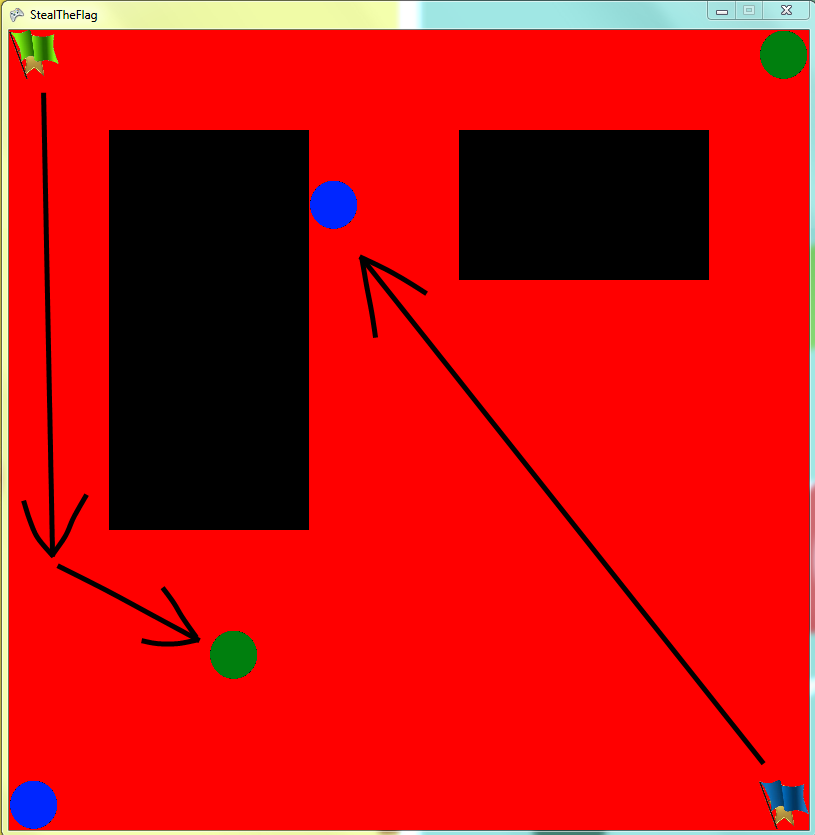
The basis for designing a decision tree requires that your AI has states to keep in mind, such as moving to a designated area and then moving back. As a start, here is the image of my AI example with all of the players in a resting state.

At this point their current state was one of doing nothing. They just sat there until I gave the program the right to start. But once they began, the Decision Making started.

---

The players at the top-right and the bottom-left of the screen are classified as defenders, whose job is to only stop players when they've picked up one of the flags, so their decision tree is telling them to sit there and wait until someone takes the flag. The other two players begin moving towards the opposing flag immediately since their decision tree dictates them to do so.


---

But why does their decision tree tell them to do so? Let's take a closer look at the decision tree involved with their movements.

Firstly there exists an overarching Decision Node. Inside this node is the "question" that it must ask, in this case that question is "Does the player currently have the flag?". Every update of the program, this Decision Node checks its question and then decides how the player will react based on the result it has found. Once an answer has been found, the Decision Node will direct towards one of the State Nodes that come along with it. These State Nodes exist simply to change the state of the player into whatever the State Node's are programmed to contain. In our example this means that if the player currently has the flag, the Decision Node will direct him to the Return to Base Node and the player will understand that he need to return to base.
Now Decision Nodes don't always need to come to an abrupt end with State Nodes. Decision Nodes could always lead into other Decision Nodes and deepen the logic further. This manner of layered Decision Nodes is what gives alot of the game's AI the ability to think, or to at least pretend that it is thinking.

---

So now that we understand why the player is moving the way he is, we can easily understand how the defenders work.

The defenders are looking for the signal when an opposing player picks up their flag. As soon as they do the Decision Node gives the defenders a new order to seek out the enemy and reclaim their flag. Their Decision Tree is very similar to the attackers, except that their only states are "defending" and "seeking".

Since the Decision Tree is nearly constantly updating, the player's will always be complying to one of their two states. Therefore when one of the defenders hits the player and returns the flag (as seen in the example with the top two players) that player will then automatically seek out the flag once again. This makes it so there is never an interruption in logic.

Tuesday, August 20, 2013

A* Pathing

A* pathing is a simple way of calculating how an AI can get from Point A to Point B in the most efficient way. The code does this by calculating which node has the least cost expended when it travels there. In the following list I'll be going step by step through what the code does when it calculates through a simple path:

  • So first, we designate the starting node and the ending node. In the example picture we use A & F.
  • To begin we start with the starting node. That node is then placed on the open list.
    • Put simply there are two lists we use in A* Pathing to keep track of what we've stepped over and what we are considering.
      • The Open List is the list that all of our currently examined node sit in.
      • The Closed List is a list of all of the nodes we've stepped over or 'completed'.
  • Then we calculate the connections to our starting node. For our example A only has one connection, B. but if it had more than one connection we'd calculate all of those as well. By calculating I mean that it finds the Heuristic and Cost to move to B, as well as the Estimated Total Cost it will get to the ending node.
    • The Heuristic is a value for how far away the current node is from the ending node. There can be many different ways of calculating this value, but the simplest is to use a bird's path or straight line from the current node to the ending node.
    • The Cost So Far is how far the node has moved from the starting node along the path. Each path has a 'distance' and as we move through the path we keep track of the cumulative amount of that 'distance' for this variable. In the example, A has a Cost So Far of Zero because it hasn't moved at all yet.
    • The Estimated Total Cost is, simply put, the sum of the Heuristic and the Cost So Far.
  • Once we have calculated all of the connections to A, it is put on the closed list.
  • Then we figure out which of the nodes on the open list has the least Estimated Total Cost. Once we find that we continue with the steps for the node A.
  • For the sake of my fingers and your eyes, we'll skip over the process for the B node since its exactly the same as A's.
  • Moving onto C, we can notice that there are now two nodes it connects to. So we calculate both of those just like before and then more C onto the closed list.
  • Because D has a lower Estimated Total Cost than E, our program should continue on with D and put E to the side on the open list for now.
  • Then once D is done calculating and is moved onto the closed list, F is chosen next because of its still lower Estimated Total Cost than E.
  • Then there's some simple logic for figuring out the end condition. The simplest way to do so would be to just have the program consider when the end node is selected but there are other end conditions where coders choose to have it so "when every node is on the closed list", that way every possibility is checked.


Now some of you might ask "But Daniel, what if E's connection to F is shorter than D's?" and the answer is simple. The way A* Pathing should work with its calculations means that if D's connection was larger, for example 7 instead of 3.5, then that would make F's Estimated Total Cost larger than E's on the open list and then we'd check E. This of course would make us reevaluate F's values and since there's no other open nodes to check we simply take F, which is the ending node and causes the ending condition.

Wednesday, May 1, 2013

Bomb Diggity - Handling Game States

In the latest rendition of Bomb Diggity, I came across the problem of retaining the same game state when accessing our in-game store menu. Due to how it was originally coded we'd erase the game state when accessing the store since we had intended for it to be a mid-point between accessing new levels. But now that Bomb Diggity has been coded to allow the player to access the store mid-game I realized that we'd be destroying the player's current field, thus not giving them the option to continue with the same level without having to restart.

Example of Problem

The solution that I came up with to fix this problem was changing how our game states were handled. Instead of deleting and recreating the same level whenever we entered the shop, I coded it so that the game states existed simultaneously. By creating both the level and the shop simultaneously the player was able to enter the shop without wiping away their current progress. A minor problem arose since both of them existed simultaneously and the shop was overlapping the level and not allowing the player to actually play the game. That was fixed by altering the "Visible" variable included with the game state and making the shop not visible to the players. Then when it was necessary to enter the shop all that needed to be done was change the variables so that the shop became the visible layer and the game level became invisible; then once the player is done it is simple to reverse the process and leave them right where they left off.

 Example After Fixing Code